
Sheet 08 of 12
Holes Across a Bend: Unfold, Cut, Refold
In 5 minutes you'll unfold a bracket, cut a slot right across its bend and two holes while it's flat, and fold it back up.
- Part
- Unfold, Cut, Refold
- Rule
- Steel 2mm
- Sheet
- t 2 · R 2 · K 0.4
- Time
- 5 min
- Status
- Open
OP 10Watch
Video in productionBuild along with the steps in OP 30 meanwhile.
Chapters
- 00:00Why cut it flat?
- 00:30The bracket
- 00:50Unfold
- 01:30Sketch the slot and holes
- 02:30Cut through
- 03:10Refold and the flat pattern
- 04:00Common mistake
- 04:30Your exercise
OP 20Turn the part
Drag to turn, scroll or pinch to zoom. Flat shows the blank before it is bent: the same sheet, the same frame.
The model shows part A, for illustration. Your part has its own sizes: build it from the drawing in OP 30.
OP 30Build it in SolidCraft
Part A of 8. Every learner gets a part with its own sizes, so the values you check below are yours to find.
A new part has new sizes. It clears this sheet's checks and ticked steps; your quiz answers stay.
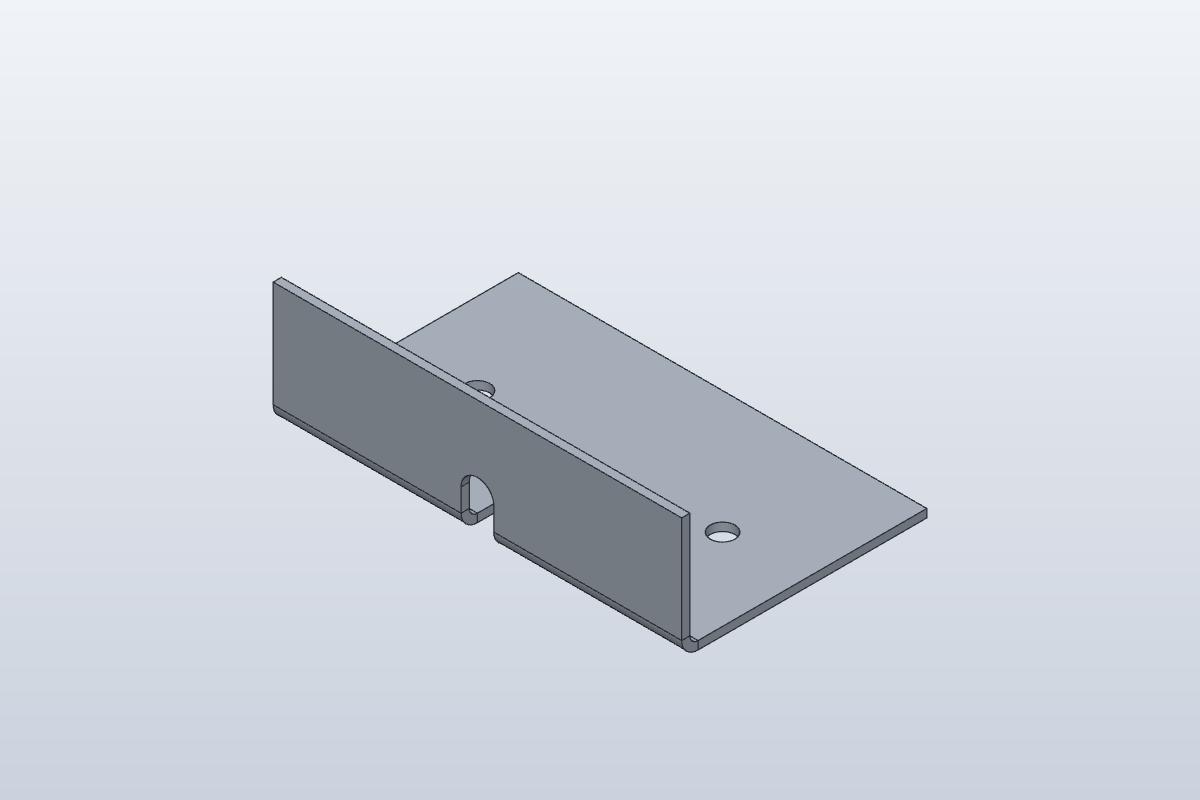
The picture shows part A, for illustration. Build your part from the drawing and the sizes listed here.
- Rule
- Steel 2mm
- Thickness
- 2 mm
- Bend radius
- 2 mm
- K-factor
- 0.4
As typed in this exercise
- Sketch Base on XY: rectangle (0, 0) to (100, 60)
- Flange: height 30
- Sketch Cuts on a face of the part: slot (50, -10) to (50, 14), width 8; circle Ø6 at (20, 30); circle Ø6 at (80, 30)
Your task
Cut a slot across the bend of this bracket in SolidCraft 0.22:
- Use the rule Steel 2mm: thickness 2 mm, bend radius 2 mm, K-factor 0.4, active.
- Build the bracket: a 100 × 60 mm rectangle on XY at the origin, Flange, then Flange on the long front edge, height 30 mm, angle 90°.
- Unfold the bracket.
- Start a new sketch on the top face of the flat sheet.
- Draw an Overall Slot from (50, -10) to (50, 14), width 8 mm: it crosses the bend.
- Draw two circles of diameter 6 mm at (20, 30) and (80, 30). Finish the sketch.
- Extrude the slot and both circles: Extent Type All, Operation Cut.
- Refold.
- Click Flat Pattern (Sheet Metal tab › Flat) and write down the flat size and the number of rows under Bends.
What to write down
- The flat length across the bend (the Flat size row; the other side is 100 mm). Compare it with lesson 1.
- How many bend lines the Flat Pattern lists under Bends.
Type them below and press Check. The solution's drawing shows the slot and both holes in the flat blank.
OP 40Inspect
Enter what SolidCraft shows you. Each value is checked against SolidCraft's own result, within the tolerance shown. Nothing you type leaves this page.
Show the drawing and bend table
exercise · Steel 2mm · t 2 · R 2 · K 0.4 · all dimensions in mm, from the blank's left and bottom edgesFlat blank 100.000 × 86.398 mm · 2 bends
| Bend | Angle | Dir. | R mm | Length mm | Allowance mm |
|---|---|---|---|---|---|
| 1 | 90° | up | 2 | 46 | 4.398 |
| 1 | 90° | up | 2 | 46 | 4.398 |
OP 50Quiz
Q1Why unfold before cutting this slot?
Through the flat material the cut is a simple shape; SolidCraft then bends it with the sheet when you refold.
Q2What does Refold do with your cut-outs?
The cut-outs stay where you put them in the flat and fold with the material.
Q3After the cuts, the flat size of the blank is…
Holes and slots are inside the blank, so its outside size doesn't change.
Every value is within tolerance. This sheet is done.
Sheet 09: Convert to Sheet Metal